
I’ll explain how to get to the manage add ons screen in IE and also point out how you can start IE without any add ons in case there is one that is causing IE to constantly crash or not load at all.
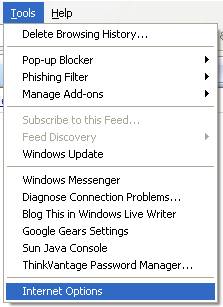
First open IE, click on the Tools menu item and then choose Internet Options. In IE 7, you may have to press the ALT key to see the menu items.
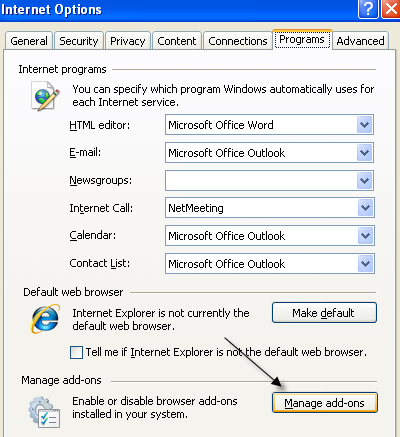
You’ll now see a list of all the add-ons that have been used by Internet Explorer and their current status, enabled or disabled.

If you want to disable an add-on, just select it from the list and choose disable at the bottom.

You’ll also see at the bottom a link to download more add ons for Internet Explorer. You can just check out the IEAddOns site to download new ones like PicLens, which is a cool plugin I had written about earlier.
Finally, if you can’t even open Internet Explorer because of some conflict with an add-on, you can start IE without any add-ons. Here’s how to do it. Simple right-click on the IE icon on your desktop and choose Start without add-ons.

Pretty simple! So hopefully, if you are having any issues with your IE add-ons, you can either disable or delete them using the above steps. Enjoy!


